

Keep your website. Add online booking.
Add Velixa’s booking flow to your existing website. Let clients choose a service, an eligible team member and an available time, using the same details and booking rules as your Velixa account.
- For websites that support embeds
- Copy your booking snippet
- Included in your plan
Bring booking to your existing site
Copy your embed snippet from Velixa and add it to a supported page on your website. Keep your existing site while managing services, availability and bookings in one account.
Copy your business’s snippet into a supported area of your website.
Use a platform and plan that allow the required embed code.
Use the branding options configured in your Velixa account.
Let the booking interface adapt to the space available.
Use the same service and staff availability as your Velixa account.
Save a card to secure the booking without taking payment. Settle on the appointment day using the saved card or cash.
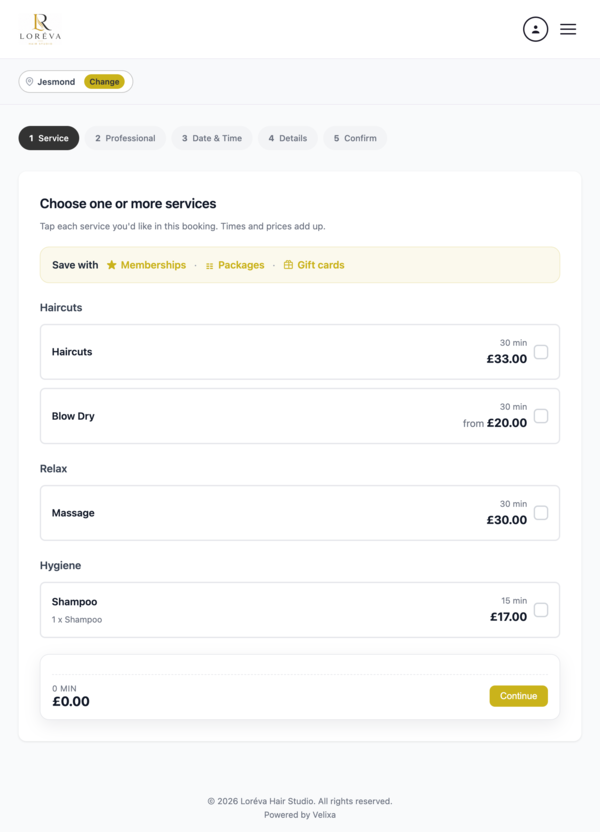
Set up your booking widget in three steps
Configure your business in Velixa, add the snippet to your website and check the booking journey before sharing it with clients.
Set up your business
Add services, staff availability and booking policies to your Velixa account.
Copy your snippet
Find your business’s embed code in the widget settings.
Add it to your website
Paste the snippet into a supported embed area, then check it on desktop and mobile.
A connected booking experience
Use your Velixa branding and service details in a booking flow that fits your website. Appointment availability stays connected to the schedules you manage in Velixa.
Your business details
Present the branding and services configured in your Velixa account.
Flexible sizing
Display the booking interface on supported phone, tablet and desktop layouts.
Shared availability
Use the same staff schedules, service rules and booking checks as your other Velixa booking channels.
Put online booking on your existing website
Start a free trial and explore the widget alongside your services and diary. Contact the team if you need help checking your website’s embed options.
Start free trial